When thinking about rownum pseudocolumn for getting pages of record we have to read some articles to remember the issues about the way rownum works.
There are thousands of articles about, so, it's healthy to have a good backup of good articles in our pocket to avoid long time search:
http://www.oracle.com/technetwork/issue-archive/2006/06-sep/o56asktom-086197.html
https://explainextended.com/2009/05/06/oracle-row_number-vs-rownum/
If you know some better articles about rownum please share with us!
terça-feira, 13 de junho de 2017


quarta-feira, 7 de junho de 2017
[SSRS] Relatório zebrado usando agrupamento
Ao usar listagens comuns no Report Server temos a boa e velha fórmula
= iif(RowNumber(Nothing) mod 2=0, "Cordesejada", "CorAlternativa")
para definir a alternância das cores das linhas, criando o efeito "zebrado".
Mas para os casos de relatórios que possuem agrupamentos e não é possível (ou facilmente) definir a ordem de renderização ou de enumeração das linhas e colunas, então a fórmula tradicional acima não funciona, ou pelo menos, não tem garantia de funcionar. Minha experiência é que não funciona mesmo quando tem agrupamento.
Para isto existe outra forma de configurar a alternância, que em meus testes deu certo até agora...
=iif(RunningValue(Fields![rowgroupfield_name].Value[.ToString],CountDistinct,Nothing) Mod 2,"Gainsboro", "White")
Há de se ter cuidado com agrupamentos que não preenchem todos os intervalos, pois podem causar problemas e confundir a fórmula, mas eu ainda não tive este problema. Há vários relatos deste problema nas discussões na Internet, inclusive para rotinas customizadas usadas no Report Code section ou com assemblies.
Fonte: https://stackoverflow.com/questions/44376/add-alternating-row-color-to-sql-server-reporting-services-report/6777983#6777983
Thanks to @ahmad.
= iif(RowNumber(Nothing) mod 2=0, "Cordesejada", "CorAlternativa")
para definir a alternância das cores das linhas, criando o efeito "zebrado".
Mas para os casos de relatórios que possuem agrupamentos e não é possível (ou facilmente) definir a ordem de renderização ou de enumeração das linhas e colunas, então a fórmula tradicional acima não funciona, ou pelo menos, não tem garantia de funcionar. Minha experiência é que não funciona mesmo quando tem agrupamento.
Para isto existe outra forma de configurar a alternância, que em meus testes deu certo até agora...
=iif(RunningValue(Fields![rowgroupfield_name].Value[.ToString],CountDistinct,Nothing) Mod 2,"Gainsboro", "White")
Há de se ter cuidado com agrupamentos que não preenchem todos os intervalos, pois podem causar problemas e confundir a fórmula, mas eu ainda não tive este problema. Há vários relatos deste problema nas discussões na Internet, inclusive para rotinas customizadas usadas no Report Code section ou com assemblies.
Fonte: https://stackoverflow.com/questions/44376/add-alternating-row-color-to-sql-server-reporting-services-report/6777983#6777983
Thanks to @ahmad.
quinta-feira, 18 de maio de 2017
RAISERROR, Transaction outcome and execution flow
Remember that when using RAISERROR inside procedures or triggers it does:
- not issue a rollback
- not interrupt the execution
For that results, when desired, use a ROLLBACK command explicitly, and a RETURN to quit from the routine. Do not misunderstand this concepts because it is so easy to think the RAISERROR will interrupt both the transaction and the execution flow.
For more detailed situations, which can apply to your case, browse on Microsoft Technet or MSDN, and google for more informations from the experts on the Internet.
Example:
Using a trigger to show the concept, we can issue any DML statements, receive an error message, and, anyway, the statements will work. No interruption. No rollback after raiserror.
CREATE TRIGGER dbo.trg_dml_testtrans
ON dbo.testtrans
AFTER INSERT,DELETE,UPDATE
AS
BEGIN
-- SET NOCOUNT ON added to prevent extra result sets from
-- interfering with SELECT statements.
SET NOCOUNT ON;
print '@@trancount: ' + cast( @@trancount as varchar);
-- Insert statements for trigger here
raiserror('raising an error...', 16, 10);
print '@@trancount: ' + cast( @@trancount as varchar);
END
insert testtrans (cola, colb) values (1, 'aaa');
insert testtrans (cola, colb) values (2, 'bbb');
update testtrans set colb='ccc' where cola=2
delete testtrans where cola=2
Each of above statements will get the errors message, even though working as expected. See one message example below, for delete statement:
@@trancount: 1
Msg 50000, Level 16, State 10, Procedure trg_dml_testtrans, Line 18
raising an error...
@@trancount: 1
Going further, the following commands show us that the delete statement (and so the insert and update) starts an implicit transaction (or automatic transaction) when executing, then commits on after successfuly perform (auto commit). That´s because you did not see any transaction statements in the example.
print '@@trancount: ' + cast( @@trancount as varchar);
delete testtrans where cola=3
print '@@trancount: ' + cast( @@trancount as varchar);
@@trancount: 0
@@trancount: 1
Msg 50000, Level 16, State 10, Procedure trg_dml_testtrans, Line 18
raising an error...
@@trancount: 1
(1 row(s) affected)
@@trancount: 0
Try to change the trigger to issue a rollback in some condition and see for yourself how funny is to work with databases. I will give you another example:
ALTER TRIGGER [dbo].[trg_dml_testtrans]
ON [dbo].[TestTrans]
AFTER INSERT,DELETE,UPDATE
AS
BEGIN
SET NOCOUNT ON;
print '@@trancount: ' + cast( @@trancount as varchar);
if (select colb from inserted) = 'zzz'
begin
raiserror('raising an error...', 16, 10);
rollback;
--use RETURN here to get out immediately
end
print '@@trancount: ' + cast( @@trancount as varchar);
END
insert testtrans (cola, colb) values (7, 'zzz');
@@trancount: 1
Msg 50000, Level 16, State 10, Procedure trg_dml_testtrans, Line 19
raising an error...
@@trancount: 0
Msg 3609, Level 16, State 1, Line 2
The transaction ended in the trigger. The batch has been aborted.
This means that the 'zzz' won't be inserted.
That's all for now, folks!
- not issue a rollback
- not interrupt the execution
For that results, when desired, use a ROLLBACK command explicitly, and a RETURN to quit from the routine. Do not misunderstand this concepts because it is so easy to think the RAISERROR will interrupt both the transaction and the execution flow.
For more detailed situations, which can apply to your case, browse on Microsoft Technet or MSDN, and google for more informations from the experts on the Internet.
Example:
Using a trigger to show the concept, we can issue any DML statements, receive an error message, and, anyway, the statements will work. No interruption. No rollback after raiserror.
CREATE TRIGGER dbo.trg_dml_testtrans
ON dbo.testtrans
AFTER INSERT,DELETE,UPDATE
AS
BEGIN
-- SET NOCOUNT ON added to prevent extra result sets from
-- interfering with SELECT statements.
SET NOCOUNT ON;
print '@@trancount: ' + cast( @@trancount as varchar);
-- Insert statements for trigger here
raiserror('raising an error...', 16, 10);
print '@@trancount: ' + cast( @@trancount as varchar);
END
insert testtrans (cola, colb) values (1, 'aaa');
insert testtrans (cola, colb) values (2, 'bbb');
update testtrans set colb='ccc' where cola=2
delete testtrans where cola=2
Each of above statements will get the errors message, even though working as expected. See one message example below, for delete statement:
@@trancount: 1
Msg 50000, Level 16, State 10, Procedure trg_dml_testtrans, Line 18
raising an error...
@@trancount: 1
Going further, the following commands show us that the delete statement (and so the insert and update) starts an implicit transaction (or automatic transaction) when executing, then commits on after successfuly perform (auto commit). That´s because you did not see any transaction statements in the example.
print '@@trancount: ' + cast( @@trancount as varchar);
delete testtrans where cola=3
print '@@trancount: ' + cast( @@trancount as varchar);
@@trancount: 0
@@trancount: 1
Msg 50000, Level 16, State 10, Procedure trg_dml_testtrans, Line 18
raising an error...
@@trancount: 1
(1 row(s) affected)
@@trancount: 0
Try to change the trigger to issue a rollback in some condition and see for yourself how funny is to work with databases. I will give you another example:
ALTER TRIGGER [dbo].[trg_dml_testtrans]
ON [dbo].[TestTrans]
AFTER INSERT,DELETE,UPDATE
AS
BEGIN
SET NOCOUNT ON;
print '@@trancount: ' + cast( @@trancount as varchar);
if (select colb from inserted) = 'zzz'
begin
raiserror('raising an error...', 16, 10);
rollback;
--use RETURN here to get out immediately
end
print '@@trancount: ' + cast( @@trancount as varchar);
END
insert testtrans (cola, colb) values (7, 'zzz');
@@trancount: 1
Msg 50000, Level 16, State 10, Procedure trg_dml_testtrans, Line 19
raising an error...
@@trancount: 0
Msg 3609, Level 16, State 1, Line 2
The transaction ended in the trigger. The batch has been aborted.
This means that the 'zzz' won't be inserted.
That's all for now, folks!
quinta-feira, 23 de março de 2017
The Autoclose effect
A valuable and simple tip for setting the autoclose property of a database and get more performance among the connections up and down. It´s in PT-BR, but you know the google translate, don't you?
https://www.dirceuresende.com/blog/sql-server-sua-instancia-esta-constantemente-com-mensagens-starting-up-database-e-databases-in-recovery-conheca-o-auto-close/
https://www.dirceuresende.com/blog/sql-server-sua-instancia-esta-constantemente-com-mensagens-starting-up-database-e-databases-in-recovery-conheca-o-auto-close/
quarta-feira, 15 de março de 2017
How to change and query the retention period of CDC cleanup job [SQLSERVER]
We can use a simple way to manage the retention period of CDC cleanup routine.
Be sure to set the database you want to change because the stored procedure use the current database.
I set up 90 days retention, using 90*24*60 minutes as argument, but you should ensure your database growth will fit in you available space. Keep track of you database size for a few days before go on vacation.
use
go
SELECT DB_ID(), [retention]
FROM [msdb].[dbo].[cdc_jobs]
WHERE [database_id] = DB_ID()
AND [job_type] = 'cleanup'
sp_cdc_change_job @job_type='cleanup', @retention=129600
go
SELECT DB_ID(), [retention]
FROM [msdb].[dbo].[cdc_jobs]
WHERE [database_id] = DB_ID()
AND [job_type] = 'cleanup'
Source: http://sqlblog.com/blogs/allen_white/archive/2012/03/07/set-and-verify-the-retention-value-for-change-data-capture.aspx
Anothe good tip in the source is this query, wich brings more information about CDC jobs settings:
select * from msdb.dbo.cdc_jobs
There are some more issues about this topic in the source, but for me the above content was enough to make my day. Hence, that´s all for now, folks!
Good queries!
Be sure to set the database you want to change because the stored procedure use the current database.
I set up 90 days retention, using 90*24*60 minutes as argument, but you should ensure your database growth will fit in you available space. Keep track of you database size for a few days before go on vacation.
use
go
SELECT DB_ID(), [retention]
FROM [msdb].[dbo].[cdc_jobs]
WHERE [database_id] = DB_ID()
AND [job_type] = 'cleanup'
sp_cdc_change_job @job_type='cleanup', @retention=129600
go
SELECT DB_ID(), [retention]
FROM [msdb].[dbo].[cdc_jobs]
WHERE [database_id] = DB_ID()
AND [job_type] = 'cleanup'
Source: http://sqlblog.com/blogs/allen_white/archive/2012/03/07/set-and-verify-the-retention-value-for-change-data-capture.aspx
Anothe good tip in the source is this query, wich brings more information about CDC jobs settings:
select * from msdb.dbo.cdc_jobs
There are some more issues about this topic in the source, but for me the above content was enough to make my day. Hence, that´s all for now, folks!
Good queries!
sexta-feira, 3 de março de 2017
Commit and Rollback are not simmetrical about @@trancount
Source: https://www.codeproject.com/Articles/4451/SQL-Server-Transactions-and-Error-Handling
That´s why it's so important to check @@trancount or track the rollbacks inside nested transactions, avoiding errors with rollback without transaction related.
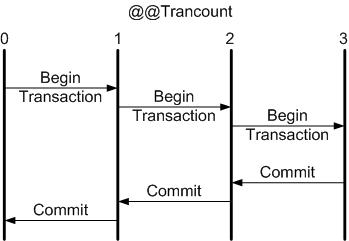
Figure 1: A COMMIT always balances a BEGIN TRANSACTION by reducing the transaction count by one.
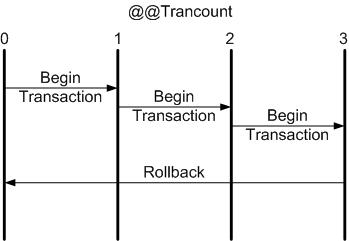
Figure 2: A single ROLLBACK always rolls back the entire transaction.
That´s why it's so important to check @@trancount or track the rollbacks inside nested transactions, avoiding errors with rollback without transaction related.
Figure 1: A COMMIT always balances a BEGIN TRANSACTION by reducing the transaction count by one.
Figure 2: A single ROLLBACK always rolls back the entire transaction.
segunda-feira, 11 de julho de 2016
Recuperando TOP N linhas de uma consulta relacionada com APPLY
Neste link tem um exemplo muito útil para as situações em que é preciso recuperar as n linhas de uma tabela relacionada para cada registro da tabela mestre, usando o CROSS APPLY (ou OUTER APPLY, quando for o caso).
http://stackoverflow.com/a/2791907/3817131
Cuidado para não cair na armadilha do
http://stackoverflow.com/a/2791907/3817131
Cuidado para não cair na armadilha do
SELECT *
FROM TABLE_A AS a
LEFT JOIN (SELECT TOP 8 id, field1, field2
           FROM TABLE_b) AS b
    ON a.id = b.id
Pois este caso traz um jon com as TOP n *GERAL* da tabela B, não de cada linha do lado esquerdo do relacionamento.Mesmo quando se tenta usar um JOIN/WHERE na subquery pegando a chave da tabela mestre para relacionar como parâmetro é preciso atentar para a sintaxe e para os resultados retornados.Em alguns casos é preciso fazer uma subquery para selecionar o resultado de um subquery mais interna.
O APPLY é uma solução elegante do TSQL e de bom desempenho, mas não é ANSI.
Assinar:
Postagens (Atom)